

You see many different Google Maps icons and symbols – things like the compass, microphone, colored roads, and more. This guide explains what each main Google Maps icon and symbol means so you always know what you’re looking at on the map.
Icons on the Home Screen
- Microphone icon: Tap this to search in Google Maps using your voice instead of typing, making it easier to find places using Google Maps icons and symbols.
- Temperature: Shows the current temperature for your present location on the main Google Maps screen.
- Box with a down arrow: Opens the map types menu, where you can switch between default, satellite, or terrain view, and turn extra layers on or off like traffic, public transit, cycling paths, 3D map, Street View, wildfires, or air quality.
- Circle with four compass points: Recenters the map on your current location so that all Google Maps icons and symbols are shown around you.
- Blue right‑facing arrow: Starts directions from your current location to another place.
Icons on the Directions Screen
Read also:US Strikes on Venezuela: María Corina Declares Maduro ‘Removed’ After Refusing to Negotiate
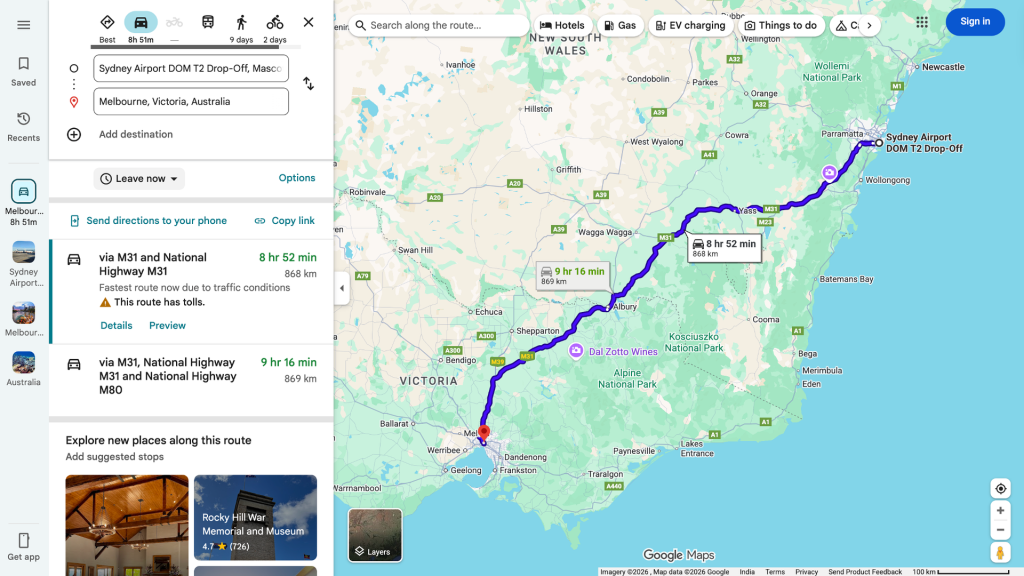
These Google Maps icons and symbols appear when you are choosing or viewing routes:
- Two arrows in opposite directions: Swaps the “from” and “to” locations.
- Car icon: Shows route and time estimate for driving.
- Bike icon: Shows route and time estimate for two‑wheelers.
- Train icon: Shows routes by public transport such as metro, train, or bus.
- Walking person: Shows a walking route.
- Clock icon next to places: Indicates a place you’ve searched for before.
Extra Google Maps icons and symbols on this screen:
- Red pin: Marks your final destination on the map.
- Dotted small circles path: Indicates a walking path that you can follow to reach your destination.
Icons on the Ongoing Journey Screen
While navigating, you see special Google Maps icons and symbols:
- Colored microphone icon: Lets you use Google Assistant directly inside Maps (for example, to call someone or play music while navigating).
- Search icon: Helps you find places along your current route, like fuel stations, coffee shops, restaurants, hotels, etc.
- Speaker icon: Controls voice guidance – you can mute, unmute, or keep only alerts.
- Compass icon: The red part points north and the gray part points south; use it to orient the map and see your direction of travel.
- Chat bubble with a plus (+): Used to report live issues such as accidents, slowdowns, construction, lane closures, stalled vehicles, or objects on the road.
- X icon: Ends your current navigation.
- Forked path icon: Shows an overview of the full route to your destination.
Traffic Condition Colors
These colors are part of Google Maps icons and symbols for live traffic:
- Green: Traffic is normal, no jams.
- Red: Heavy traffic or traffic jam.
- Yellow/Orange: Light to moderate congestion.
Icons for Places in Google Maps
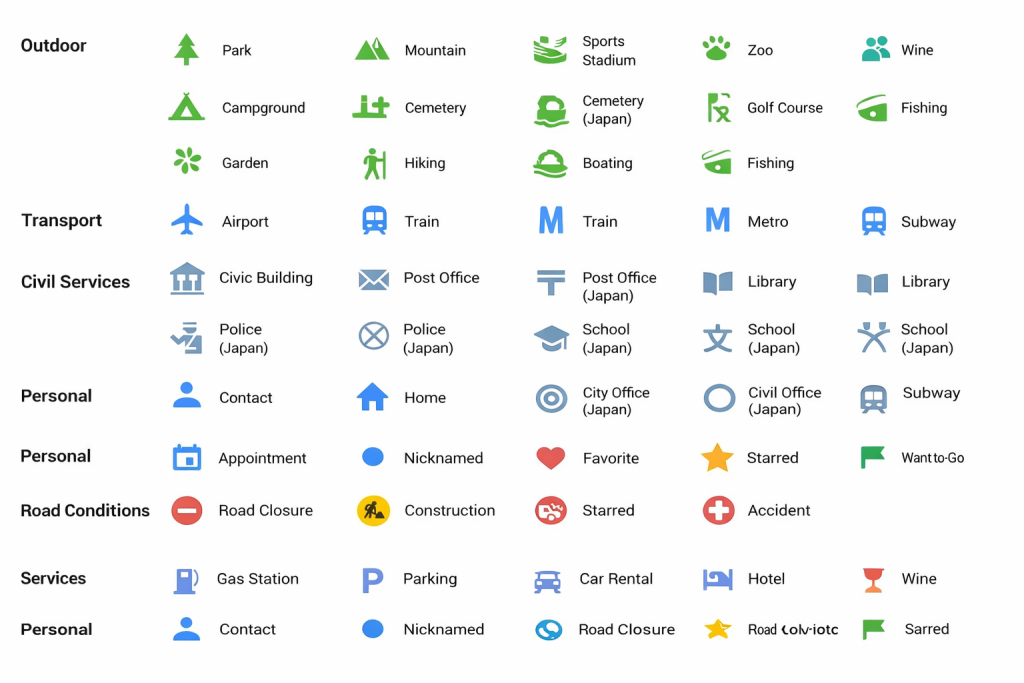
Source: Google Blog
Personal icons
These Google Maps icons and symbols mark your personal places:
- Person: A contact’s saved location.
- House: Your home.
- Bag/briefcase: Your workplace.
- Calendar: Location of an appointment or event.
- Heart: A place you’ve saved as a favorite.
- Star: A starred (saved) place.
- Green flag: A place you want to go (a marked target).
Road condition icons
- Man with a shovel: Roadwork or construction ahead.
- Red circle with a dash: Road closed or no‑entry.
- Yellow triangle with exclamation mark: Possible road closure or warning.
- Red car with a half star: Possible crash or accident reported.
Food and shopping icons
These Google Maps icons and symbols show food and shopping places:
- Knife and fork: Restaurants and food places.
- Wine glass: Bars or wine places.
- Cup and saucer: Cafés.
- Shopping bag: General shopping spots.
- Trolley/cart: Grocery stores or supermarkets.
Entertainment and sightseeing icons
- Color palette: Art galleries or art‑related spots.
- Lighthouse: Lighthouse.
- Comedy/tragedy masks: Theatre.
- Camera: Tourist attractions/viewpoints.
- Dice: Casino.
- Fish: Aquarium.
- Swing/ride: Amusement park.
- Statue: Historical or notable statue.
- “M” in a building: Museum.
- Film strip/camera film: Cinema or movie theatre.
- Tower/column: Monument.
- Musical note/jingle: Music venue.
- Three stacked boxes: Relic or historical artifact‑related place.
Services icons
- Fuel pump: Petrol/gas station.
- P: Parking area.
- Car with key: Car rental.
- Bed: Hotel or lodging.
- Umbrella with stand: Resort.
- Currency symbol: Bank.
- ATM: Cash machine/ATM.
Health icons
- H: Hospital.
- Plus sign (+): Pharmacy or medical store/clinic.
Outdoor activities icons
These Google Maps icons and symbols show outdoor and nature spots:
- Tree: Park.
- Mountain: Hill or mountain.
- Person playing sports: Stadium or sports ground.
- Animal footprint: Zoo.
- Tent: Campground.
- Tree with grave/board: Cemetery.
- Golfer icon: Golf course.
- Leaves: Garden or botanical place.
- Person with walking stick: Hiking trail.
- Boat: Boating spot or marina.
- Fish in water: Fishing location.
Transport icons
- Airplane: Airport.
- Train: Train station.
- M: Metro station.
- Subway icon: Underground/subway station.
- Bus: Bus stop or bus station.
- Boat on water: Ferry terminal.
Meaning of Icon Colors
Color is also part of how Google Maps icons and symbols are organized:
- Orange: Food and drinks.
- Blue: Shopping and transport.
- Reddish‑pink: Health.
- Teal: Entertainment and leisure.
- Purple: Services.
- Grey: Public services and places of worship.
- Green: Parks and outdoor activities.
Other Map Icons
- Yellow star in a map pin: A place you’ve saved or starred.
- Blue dotted line/path: Shows where Street View is available; tap on the blue line to see Street View imagery of real roads and buildings, which is another type of Google Maps icon and symbol on the map.So, what do you think? Let me know in the comments. And if you found this article helpful, share it with your friends.for more subscribe newssy.in.