



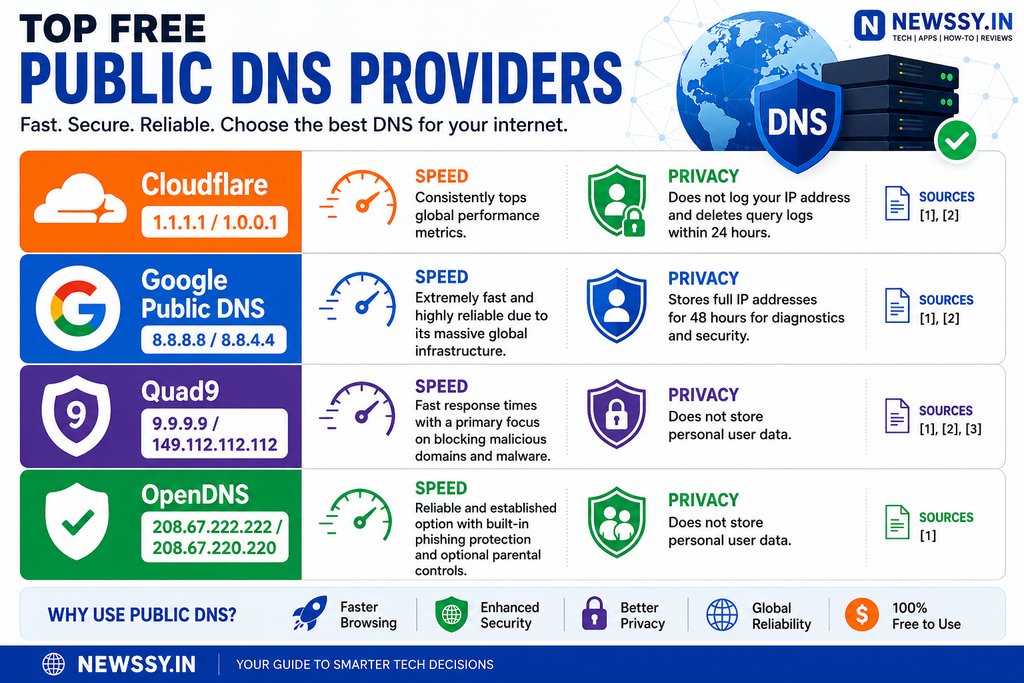
If you want a public DNS server that balances speed, privacy and security, Cloudflare 1.1.1.1 is the strongest general-purpose choice. Google Public DNS is a good alternative for reliability and broad global availability, while Quad9 is the better pick if blocking malicious domains is your priority.
The important point is that there is no single DNS resolver that is fastest for every connection. Your ISP, location, routing and cache conditions can change the result.
Best public DNS servers at a glance
| DNS provider | IPv4 addresses | Main strength | Best for |
|---|---|---|---|
| Cloudflare | 1.1.1.1, 1.0.0.1 | Speed and privacy | Most users |
| Google Public DNS | 8.8.8.8, 8.8.4.4 | Global availability and reliability | General use |
| Quad9 | 9.9.9.9, 149.112.112.112 | Malware blocking | Security-focused users |
Cloudflare supports DNSSEC, DNS-over-HTTPS (DoH) and DNS-over-TLS (DoT). Google Public DNS also supports DNSSEC, DoH and DoT. Quad9’s recommended service combines malware blocking with DNSSEC validation and encrypted DNS options.
1. Cloudflare 1.1.1.1 — best overall
Primary DNS: 1.1.1.1
Secondary DNS: 1.0.0.1
Cloudflare built 1.1.1.1 as a public recursive resolver with an emphasis on speed, privacy and security. Its documentation says the service operates across hundreds of cities and supports encrypted DNS through both DoH and DoT.
Privacy is one of its clearest advantages. Cloudflare says it does not sell or share personal data from the public resolver with third parties or use that data for advertising. It also says source IP addresses from DNS queries are not retained in non-volatile storage, apart from a small sampled portion of network traffic collected for operational purposes.
Cloudflare DNS also validates DNSSEC responses. DNSSEC allows a resolver to verify cryptographic signatures attached to DNS records rather than simply trusting the returned address.
Best for: everyday browsing, privacy-conscious users and people who want encrypted DNS.
One limitation
1.1.1.1 is not primarily a malware-blocking resolver. Cloudflare offers separate 1.1.1.1 for Families configurations when you want additional filtering.
2. Google Public DNS — best for broad compatibility
Primary DNS: 8.8.8.8
Secondary DNS: 8.8.4.4
Google Public DNS is a free global recursive DNS service. Google’s anycast network routes client requests to locations advertising the public addresses, with routing changing according to network conditions and traffic load.
Google validates DNSSEC responses and supports encrypted DNS through DoH and DoT. It does not normally provide general-purpose content filtering or ad blocking.
There is also a privacy trade-off worth knowing. Google’s current documentation says temporary logs can contain both the client’s IP address and DNS query information and are normally deleted within 24–48 hours. Permanent logs remove the IP address and retain aggregated information such as requested domains, request type and approximate location.
Best for: users who want a well-established resolver with worldwide infrastructure and strong protocol support.
A useful detail for Indian users
Google Public DNS explicitly lists India among jurisdictions where it can block DNS resolution when required by enforceable court or government orders. That means switching to Google DNS does not mean every DNS-level restriction disappears.
3. Quad9 — best for security
Primary DNS: 9.9.9.9
Secondary DNS: 149.112.112.112
Quad9 takes a different approach from a basic fast resolver. Its recommended service blocks lookups for known malicious hostnames while also providing DNSSEC validation. Quad9 says its threat-blocking service protects against threats including malware, phishing, spyware and botnets.
As of June 15, 2026, Quad9 enabled strict DNSSEC validation across all of its service endpoints. Its recommended 9.9.9.9 service continues to provide malware blocking and DNSSEC validation.
Quad9 also provides encrypted DNS endpoints, including DoH and DoT.
Best for: families, home networks and users who want DNS-level protection against known malicious domains.
One limitation
Security filtering can occasionally be inconvenient if a legitimate domain is classified incorrectly. Quad9 also offers different endpoints for users who need different combinations of threat blocking and EDNS Client Subnet behavior.
Which DNS should you choose?
A simple decision framework works better than declaring one resolver the universal winner.
Choose Cloudflare 1.1.1.1 if:
- You want a strong balance of speed and privacy.
- You want DoH or DoT.
- You do not need aggressive malware filtering.
Choose Google Public DNS if:
- You want a widely available general-purpose resolver.
- Reliability and compatibility matter more than specialized filtering.
- You are comfortable with Google’s documented logging practices.
Choose Quad9 if:
- Security is your first priority.
- You want malicious-domain blocking at the DNS layer.
- You want DNSSEC validation and encrypted DNS.
Does changing DNS actually make the internet faster?
Sometimes, but DNS is only one part of page loading.
Suppose your current resolver takes 80 ms to answer a new DNS query and another resolver takes 25 ms. The theoretical saving is 55 ms for that lookup. That does not mean every website becomes 55 ms faster.
Modern browsers reuse DNS results through caching. Once the answer is cached, changing resolvers can have little effect on subsequent requests.
This is why the right test is not simply “which DNS has the lowest advertised latency?” Test the resolver from the connection you actually use.
A resolver that is excellent in a benchmark from another country can perform differently on your broadband or mobile connection.
DNS encryption: DoH vs DoT
Traditional DNS can be sent without encryption. Two common alternatives are DNS-over-HTTPS (DoH) and DNS-over-TLS (DoT).
DoH sends DNS queries through HTTPS, normally using port 443. Cloudflare says this makes DNS traffic harder to distinguish from ordinary HTTPS traffic while protecting queries from interception and modification.
DoT uses a TLS-encrypted connection, normally on port 853.
Encryption and DNSSEC solve different problems. Encryption protects the connection between your device and resolver from observers on the network path; DNSSEC helps verify that DNS data itself is authentic. Using both provides stronger protection than treating either one as a replacement for the other.
How to change your DNS server
The exact menu depends on your device and operating system, but the process is straightforward:
- Open your network or Wi-Fi settings.
- Find the DNS server configuration.
- Replace the existing DNS addresses with the provider you want.
- Add the provider’s secondary address where the operating system supports it.
- Save the settings.
- Disconnect and reconnect to the network if necessary.
- Test DNS resolution.
For Google Public DNS, the official IPv4 addresses are 8.8.8.8 and 8.8.4.4; its official documentation also provides IPv6 configuration details.
Do not blindly mix resolvers with different security policies. Google specifically warns that combining a DNSSEC-validating resolver with one that does not validate DNSSEC can weaken DNSSEC protection.
FAQs
Is Cloudflare 1.1.1.1 better than Google DNS?
Not universally. Cloudflare has a particularly strong privacy position and supports encrypted DNS, while Google offers a large global anycast infrastructure and DNSSEC validation. The better choice depends on your priorities and connection.
Is Quad9 safer than Cloudflare?
For DNS-level malicious-domain blocking, Quad9 has the clearer advantage because its recommended resolver blocks known malicious hostnames. Cloudflare’s standard 1.1.1.1 resolver focuses more on general DNS resolution, privacy and security.
Does public DNS hide my IP address?
No. Changing DNS does not make you anonymous. It changes which recursive DNS resolver receives your DNS queries. Your normal internet connections still expose your IP address to the websites and services you connect to.
Should I use the fastest DNS server?
Not based on a global ranking alone. The fastest resolver for your connection depends on network routing, resolver location, caching and current conditions. Test the major providers from your own network.
Is DNS-over-HTTPS worth enabling?
For users concerned about DNS monitoring or tampering on the local network, encrypted DNS is useful. DoH encrypts the DNS connection between the client and resolver, while DNSSEC provides validation of signed DNS responses.