

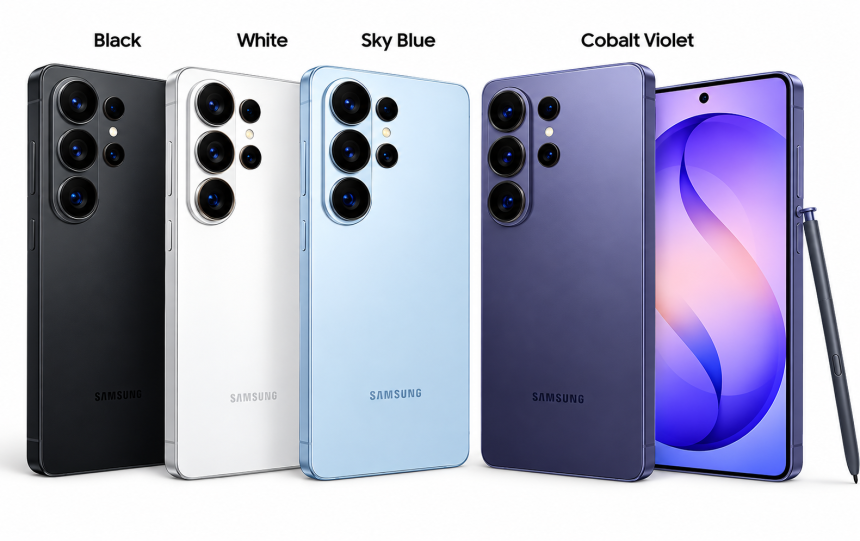
The Galaxy S26 Ultra sits at the top of Samsung’s S-series — above the standard S26 and the S26+. It’s built for people who don’t want to choose between a good camera and good gaming performance, or between a big screen and a phone that actually lasts through a workday. Students, gamers, photographers, content creators, road-warrior professionals — this guide is for anyone trying to figure out if that “Ultra” label means anything for their specific life, or if it’s just a bigger number on a price tag.
What actually is the S26 Ultra?
It’s Samsung’s flagship for the year, full stop. Above it, nothing (from Samsung, anyway — the iPhone Pro Max crowd will disagree). Below it, the S26 and S26+, which drop some of the camera hardware and the S Pen to hit a lower price.
The pitch is simple: one device that does everything reasonably well instead of forcing trade-offs. A college student takes lecture notes on it, scans a syllabus, sits through a Zoom class, then plays a match of something after dinner. A creator shoots B-roll on a trip, cuts a rough edit on the train home, posts before landing. That’s the fantasy, anyway — and for a lot of people it holds up.
Why anyone should care
Raw processor speed stopped being the whole story a few years back. What people actually notice day to day:
- How smart the camera is about a tricky lighting situation
- Whether the phone still feels fast eighteen months in
- Battery that survives a full day without you thinking about it
- Whether the AI stuff is actually useful or just a bullet point
The Ultra tries to hit all of these at once — big AMOLED display, flagship chipset, a stacked camera array, Galaxy AI features, a battery meant to go the distance, and the S Pen for anyone who still writes things by hand. That’s a lot to ask of one device, and it doesn’t mean everyone needs it. If your phone life is mostly WhatsApp, YouTube, and the occasional photo of your dog, a cheaper Galaxy will do the job and you’ll never notice the difference.
The specs, briefly (check Samsung’s site for your region)
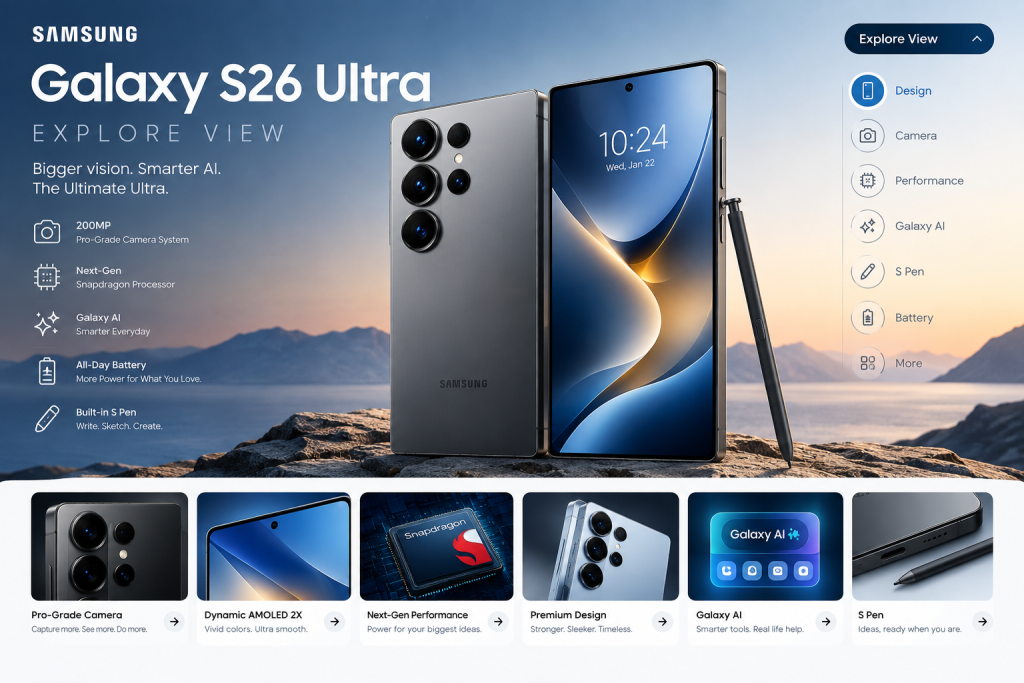
Display — Large, high-res AMOLED, smooth scrolling, the kind of screen that makes you forget you’re reading on a phone.
Processor — A flagship chip built for heavy games, AI processing, and running six apps at once without stuttering.
Cameras — Multiple lenses covering everyday shots, portraits, wide landscapes, and zoom.
S Pen — Built in. Handwriting, sketching, precise edits.
Exact numbers — chip variant, charging wattage, sensor sizes — vary by region and change close to launch, so don’t trust a spec sheet you found on a random blog. Go to Samsung directly.
Design and screen
The size is the whole point, and also the catch. A big AMOLED panel is genuinely great for movies, photo editing, PDFs — anything where more screen real estate helps. Higher refresh rates make scrolling and supported games feel noticeably smoother, the kind of thing you don’t appreciate until you go back to a slower phone and it feels broken.
Students get more room to read a document while a second window sits open. Gamers get a display that keeps up with fast-paced titles. Photographers get a screen bright and detailed enough to actually judge a shot instead of guessing.
The trade-off: it’s a big phone. One-handed use gets awkward. Some pockets will not be happy about it.
Camera: where the marketing gets loud
This is where Samsung spends most of its ad budget, and for good reason — it’s usually the deciding factor for people torn between phones. But megapixel counts are mostly noise. What actually determines whether a photo looks good is processing, autofocus speed, exposure handling, stabilization, and how the sensor behaves once the lights go down.
Everyday shots. People, food, pets, whatever you point it at on a random Tuesday. AI processing helps with tricky exposure, though results still depend heavily on the actual lighting — no phone fixes a truly bad scene.
Zoom and portraits. A dedicated telephoto lens beats cropping a regular photo every time, which matters if you shoot sports, wildlife, or anything far away. Portrait mode lives or dies on subject separation and whether skin tones look like skin instead of plastic. Honestly, the only way to judge this properly is side-by-side comparisons in daylight, indoors, and at night — trust photo samples over spec sheets.
Video. Creators care about stabilization, mic quality, resolution options, and storage more than a single headline camera number. If you’re planning long recording sessions, check storage capacity and whether the phone runs hot after twenty minutes — that’s a real problem on some flagships, not a hypothetical.
Gaming performance
A strong chipset plus a good display is most of the gaming pitch here. Titles like PUBG Mobile, Call of Duty: Mobile, Genshin Impact, and the heavier racing games all benefit from that combination.
But raw power isn’t the whole story. Sustained performance — not the impressive number in the first five minutes — depends on cooling, software optimization, your actual settings, and even the room temperature. A phone that’s blazing fast for ten minutes and then throttles hard is worse for competitive play than one that’s consistently just okay.
Things worth checking before you buy for gaming specifically:
- Frame rates during long sessions, not short bursts
- Touch response and refresh rate
- How hot it gets under load
- Battery drain while gaming
- Storage room for large games and their updates
- Accessory support if you use a controller
Photography and travel
Carry one device for navigation, photos, video, and editing — that’s the appeal for travelers. Wide shots of a skyline, a zoomed-in shot of something across the street, a quick travel vlog cut on the plane home. It genuinely replaces a point-and-shoot for most casual trips.
Dedicated cameras still win for serious photography work — interchangeable lenses, bigger sensors, specialized workflows nobody’s squeezing into a phone body. But for most people, most of the time? The phone in your pocket is the camera you actually have with you.
Galaxy AI — useful, or just a checkbox?
Samsung’s AI features cover writing assistance, translation, image editing, and general productivity tools. The honest answer is: it depends entirely on whether the feature solves a problem you actually have. A traveler using real-time translation in an unfamiliar country gets real value. Someone using AI to “improve”a text message they could’ve written in ten seconds — less so.
AI photo editing can remove distractions or fix a shot, but treat it as an assist, not magic. Before getting excited about any specific AI feature, check three things: does it work in your language, does it need an internet connection, and is it limited by region or account type. Samsung has a history of rolling features out unevenly across markets.
For students and working professionals
The big screen and S Pen are the real differentiators here, not the camera. Quick handwritten notes, marking up a PDF mid-lecture, sketching a diagram — the stylus genuinely changes how you use the phone if you’re someone who thinks better with a pen in hand.
If you don’t write by hand and don’t annotate documents, though, you’re paying for a feature you’ll never touch. Be honest with yourself about that before the upgrade.
First flagship vs. seasoned upgrader
New to premium phones? Focus on battery, camera, storage, how easy it is to use, and price. Skip the feature checklist — most of it won’t matter to you yet.
Already own a recent Ultra? You’re the harder sell. The real question is whether this generation’s camera, software, or gaming improvements are noticeable enough to justify the cost, not whether the spec sheet looks longer.
The honest pros and cons
What’s genuinely good:
- A do-everything device that covers gaming, photography, productivity, and entertainment without major compromises
- A screen that makes video, reading, and games feel better
- A camera system flexible enough for most real situations
- AI and S Pen tools that are actually useful — if you use them
What’ll annoy you:
- The price. Flagship hardware costs flagship money, especially at launch
- Size — great for media, awkward for small hands and small pockets
- Heavy gaming and video recording chew through the battery fast
- A chunk of the AI features you’ll never open more than once
- More cameras doesn’t mean perfect photos in bad light — that’s still physics
- Case, charger, screen protector — the “real” price is higher than the sticker
Mistakes people actually make buying this phone
- Maxing out storage without checking what they actually need
- Assuming a high megapixel count means a better camera (it doesn’t)
- Comparing benchmark peaks instead of sustained performance
- Ignoring how the size and weight feel in an actual pocket
- Buying on AI marketing alone without testing the features
- Skipping the comparison against the cheaper S26 and S26+
- Assuming every region gets the same chip, storage, or launch deal
A buying checklist, if you want one
- Set a real budget — accessories included, not just the phone
- Pick storage based on your actual game library and photo/video habits
- Check regional specs — processor, RAM, camera, charging support all vary
- See the display in person if you can — size and brightness matter more than a spec sheet suggests
- Look at real camera samples, not marketing photos — daylight, night, zoom, portraits
- Test battery against your actual lifestyle, not the advertised number
- Compare against the iPhone Pro Max, other Galaxy models, and whatever OnePlus or Google are shipping this year
Setting it up once you’ve bought it
Transfer your data using Samsung’s migration tools. Set up your screen lock and fingerprint, turn on device tracking while you’re at it. Adjust brightness and refresh rate to taste. Get Samsung Notes and your calendar set up, and only enable the S Pen shortcuts you’ll actually use — most people set up five and use one.
For gaming, turn on the supported performance modes and close background apps before a session. Don’t push demanding games while the phone’s already warm; that’s when throttling kicks in hardest. And back up your photos somewhere off-device — flagship storage fills up faster than people expect.
Quick tips before you dive in
- Try the different camera modes before you actually need a good photo
- Use the S Pen for notes or PDF markup if precision matters to you
- Turn on automatic updates
- Keep it away from heat — cars in summer, direct sun, that kind of thing
- Get a real charger and a case
- Check the privacy settings on AI and cloud features
- Kill the notifications you don’t need
- Judge battery life by your own use, not the number on the box
Common Doubts:
Is it good for gaming? Built for it, yes — but the real answer depends on cooling, display, and how the chip behaves in your specific games after twenty minutes, not the launch benchmark.
How’s the camera, really? Versatile, on paper. Trust independent photo comparisons over spec sheets, especially for night shots and zoom.
What AI features does it actually have? Writing help, translation, image editing, general productivity tools — availability shifts by region, language, and software version, so check before you buy expecting a specific feature.
Does it come with an S Pen? Yes, built in on the Ultra line. Confirm exactly what it supports on your specific model before assuming.
Battery life? Depends entirely on brightness, gaming, and how much you’re on mobile data versus WiFi. Independent tests matching your actual habits beat any number Samsung prints.
Is it worth it for students? If you actually want the camera, the screen, and the S Pen — yes. If you’re mostly texting and browsing, save the money.
Better than the iPhone Pro Max? Depends what you value. Android flexibility, the S Pen, and Galaxy AI pull one way; Apple’s ecosystem and video workflow pull the other. Compare the current models, not brand loyalty from five years ago.
What’s the price? Varies by country, storage tier, and launch promotions — check Samsung’s regional store directly rather than trusting a number from elsewhere.
Should I upgrade from an older Ultra? Only if this generation’s camera, battery, or gaming improvements are ones you’ll actually notice. If your current phone still does the job, wait for a discount.If you like this article subscribe newssy.in .